
Windows 'Run' Commands
Below is a non-comprehensive list of run commands for Windows. 'Run' is a command-line tool found in Windows as well as other operating systems used to open programs, hidden settings and start various functions such as running scheduled events. It exists as a more advanced search tool found within the Start menu.
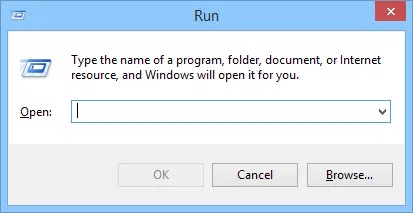
First off: How to launch it
There are several methods to open the Run dialogue:
- On the keyboard, hold the Windows logo key ⊞ + R key at the same time.
- From Windows 7 and under, you can click the "Run..." icon in the Start Menu.
- In Windows 8 and newer, open Start and search for 'Run' - [⊞Start] + Type "Run" and hit enter.
Main Commands:
- winver - opens the "About Windows" dialogue displaying version information and copyright information.
- charmap - opens the character map, a font character viewer.
- cmd - opens Command Prompt.
- taskmgr - opens Task Manager.
- msinfo32 - opens System Information.
- explorer/explorer.exe - launch an instance of File Explorer or relaunch Windows Explorer in the event the Start Mneu and desktop icons dont appear.
Programs:
- msedge.exe - launches an instance of Microsoft Edge.
- mspaint - launches Microsoft Paint.
- calc - opens the calculator.
- notepad - launches Notepad.
Control Panel and System:
- regedit - opens the Registry Editor.
- devmgmt.msc - Opens Device Manager.
- fonts - opens the Fonts manager/fonts folder.
- diskmgmt.msc - opens Device Manager.
- msconfig - Open system configuration.
- control - launches control panel.
- control userpasswords2 - opens the advanced "User Accounts" control panel.
- control keyboard - opens Keyboard Properties.
- control mouse - opens Mouse Properties.
- control folders - launches the Folder Properties window.
Defunct Commands:
Listed below is a set of commands that no longer work in some newer versions of Windows:.
- iexplore.exe - launches an instance of Internet Explorer (IE). This is a defunct command as IE is removed starting with Windows 11.
- mplay32 - Used to launch an older version of Windows Media Player (WMP) in Windows XP and under. This older version co-existed along the current version released in XP.
- tourstart - launches the Windows Tour in Windows XP.
- sndvol32 - opens Volume Control. Only works in versions leading up to Windows 7.
- shutdown - is supposed to force a shut down in Windows. However, entering this command leads to mixed results.
- write - opens Wordpad or 'Microsoft Write' as it was known before Windows 95.
